
Home/Free tools/Photo metadata remover
Free EXIF remover

Remove hidden photo data before you post

Product photos taken at home can carry your GPS location, camera details and the date you shot them. See exactly what's in each file, then download clean copies.
Free, no sign-upRuns in your browserYour photos never leave your device
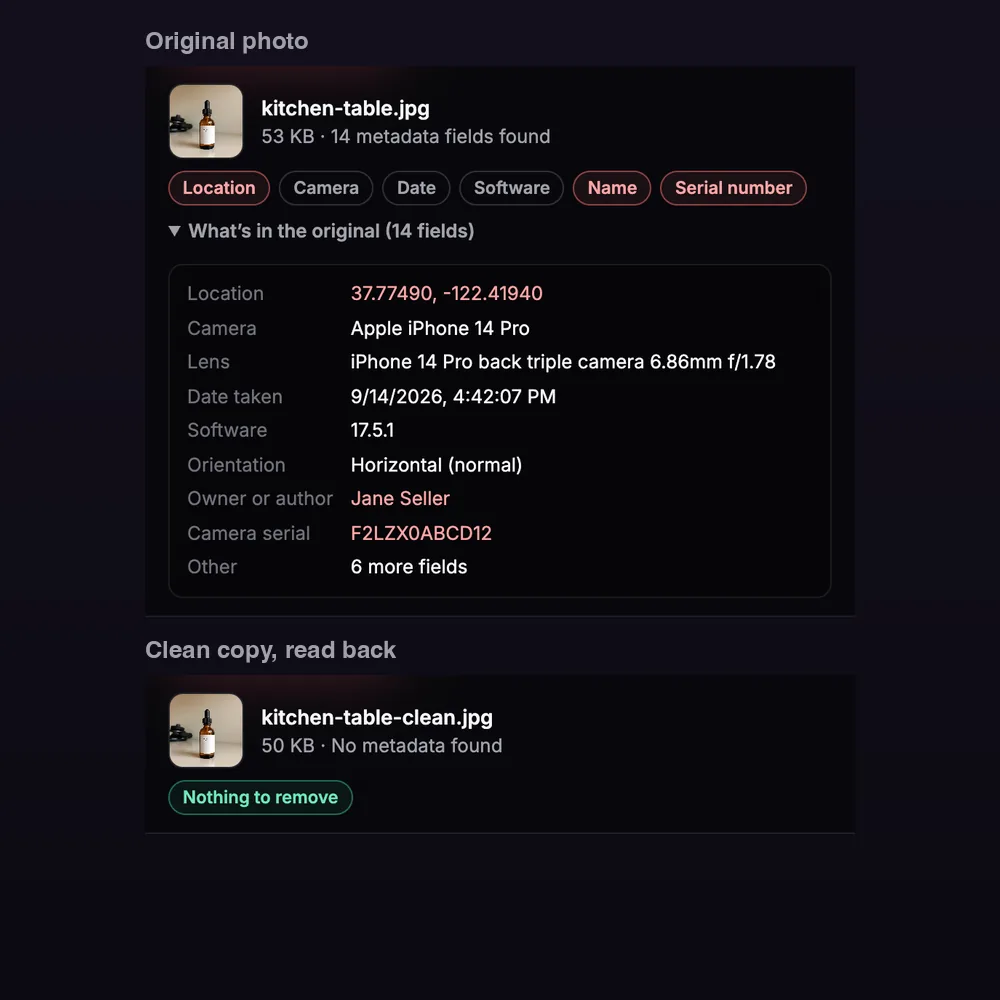
A test photo with sample GPS, camera and serial number tags, and its clean copy with no metadata
Free · runs in your browser

Photo Metadata (EXIF) Remover

No sign-up. Your photo never leaves your device.

Removing metadata saves a new copy of each photo. A JPG or WebP is compressed again at the quality above, so it can change slightly in size and detail. PNG output is lossless. HEIC photos are saved as JPG. The photo keeps its correct rotation.

Add photos to see what they reveal: camera, date, location and more.
Features

Everything you need, nothing you don't

See what's inside

GPS location, camera and lens, date taken, software, orientation, author name and serial number.

Remove it all

Each photo is saved as a new file with no EXIF, GPS, XMP or IPTC data.

Checked after

Every clean copy is read back to confirm no metadata is left.

Right way up

Photos keep their correct rotation after the orientation tag is removed.

Up to 20 at once

Clean a batch and download each file or all of them as one ZIP.

HEIC too

Opens iPhone HEIC photos and saves them as JPG.

How it works

Done in 3 steps

01

Add photos

Drop up to 20 JPG, PNG, WebP or HEIC files.

02

Review the metadata

See which photos carry a location, camera details or your name.

03

Remove and download

Save clean copies one by one or as a ZIP.

FAQ

Questions about photo metadata remover

Is the metadata remover free?
Yes. It's free with no sign-up, no credits and no watermark.
Are my photos uploaded?
No. Reading and removing metadata both happen in your browser. Your photos never leave your device.
Why should sellers remove photo metadata?
Phones save the GPS location in every photo by default. If you shoot products at home and upload the original file to your own website, a blog or a forum, anyone who downloads it can see where you live. Large marketplaces often strip this data, but many sites and email attachments keep it.
Does removing metadata reduce quality?
The tool saves a new copy of each photo. JPG and WebP are compressed again at the quality you choose (92 by default), which can change size and fine detail slightly. PNG output is lossless, so the pixels stay the same.
Will my photo end up sideways?
No. Phones often store photos sideways with a tag that says how to turn them. The tool turns the photo upright first, so the clean copy looks the same without that tag.
What else is removed?
Everything stored alongside the pixels: EXIF, GPS, XMP, IPTC and embedded color profiles. Photos in a wide-gamut color space, such as Display P3, are saved in standard sRGB, which can look a little less saturated.
Can it read iPhone HEIC photos?
Yes. It reads their metadata and saves the clean copy as a JPG. If your browser can't open HEIC, the page loads a converter that runs in your browser.

Remove metadata today

14 days free, 200 credits, no card.

Start free trial
✖