
Turn your cost into the right price
Enter your cost and a markup to get the selling price, or a price to get the markup. See margin next to markup so you never confuse the two.
Markup Calculator
No sign-up. Your numbers never leave your device.
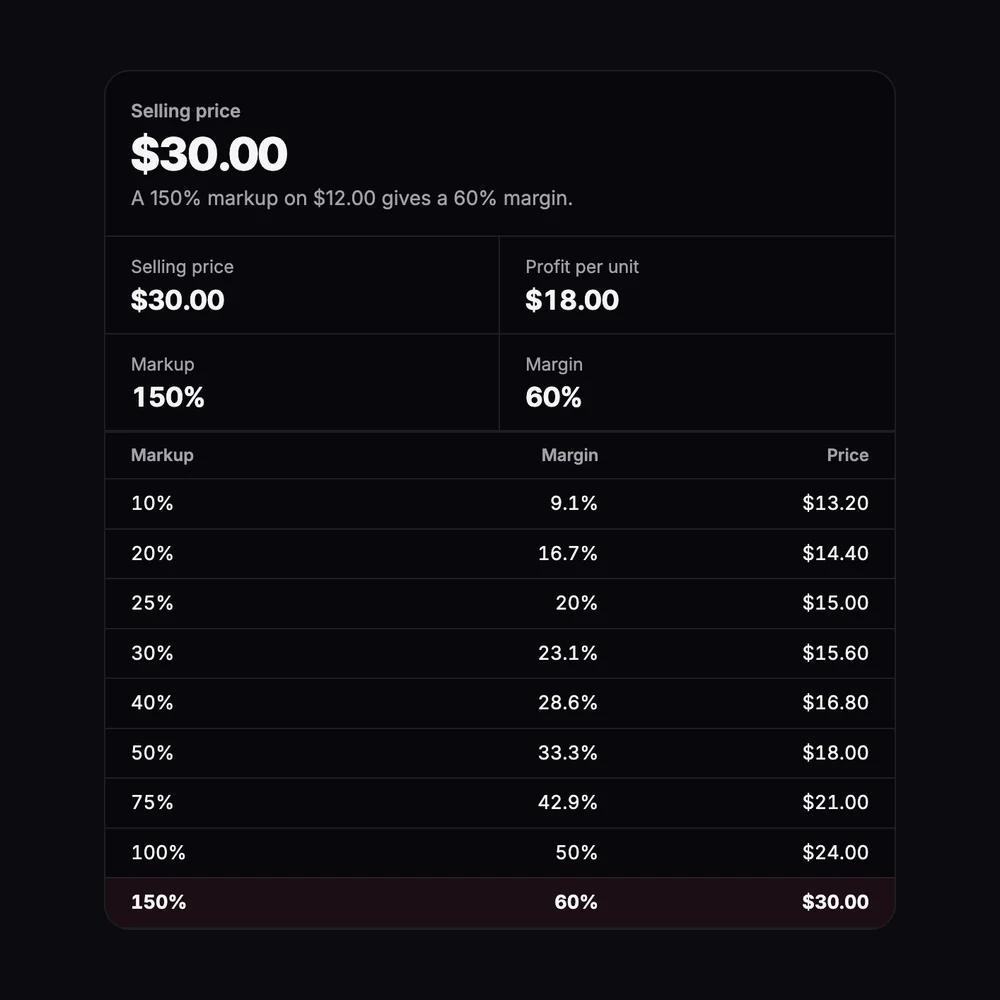
Markup is profit as a share of your cost. Margin is profit as a share of the selling price. A 100% markup doubles your cost and gives a 50% margin. The starting numbers are only an example, and fees, shipping and ads aren’t included: use the profit margin calculator for those.
| Markup | Margin | Price |
|---|
How it’s calculated
- Price from markup:
price = cost × (1 + markup). A cost of 12 with a 150% markup sells for 30. - Markup from price:
markup = (price − cost) ÷ cost. - Price for a margin:
price = cost ÷ (1 − margin). A cost of 12 at a 60% margin sells for 30. - Markup to margin:
margin = markup ÷ (1 + markup). Margin to markup:markup = margin ÷ (1 − margin).
Everything you need, nothing you don't
Price from markup
Cost plus markup gives the selling price and profit per unit.
Markup from price
Enter the price you charge to see your markup and margin.
Price for a margin
Enter the margin you want and get the price that delivers it.
Markup to margin table
Common markups from 10% to 300% with their margins and prices at your cost.
Formulas shown
Every result shows how it's calculated.
Private
The math runs in your browser. Nothing is saved or sent.
Done in 3 steps
Enter your cost
What one unit costs you, including packaging.
Add markup, price or margin
Pick what you know: a markup, a selling price or a target margin.
Read the results
Price, profit, markup and margin, plus the conversion table.